Last Updated: 25 October 2026
Author: Muhammad Imran – Educativz.com
Newspaper source: Jang Lahore, 25 October 2026, page 20 and honhaarscholarship.punjabhec.gov.pk (Punjab Higher Education Commission)
WhatsApp Group & Channel: Channel & Group
Quick answer: The Chief Minister’s Punjab Honhaar Undergraduate Scholarship Program 2026 (Phase IV) is open for 50,000 new scholarships. Apply online only at honhaarscholarship.punjabhec.gov.pk. Last date: 9 November 2026 (ad and the portal’s own FAQ agree) – that is 15 days from 25 October 2026. You need a Punjab domicile, family income under Rs 350,000 a month (public-sector institutions) or Rs 500,000 (partner federal/private universities), and an income affidavit on e-stamp paper. There is no age limit, no application fee and no hard copy. This October 2026 guide walks through every step with real screenshots.
50,000 new scholarships Tuition fee covered Punjab domicile No age limit Income Rs 350k / Rs 500k E-stamp affidavit Apply online only Last date 9 Nov 2026
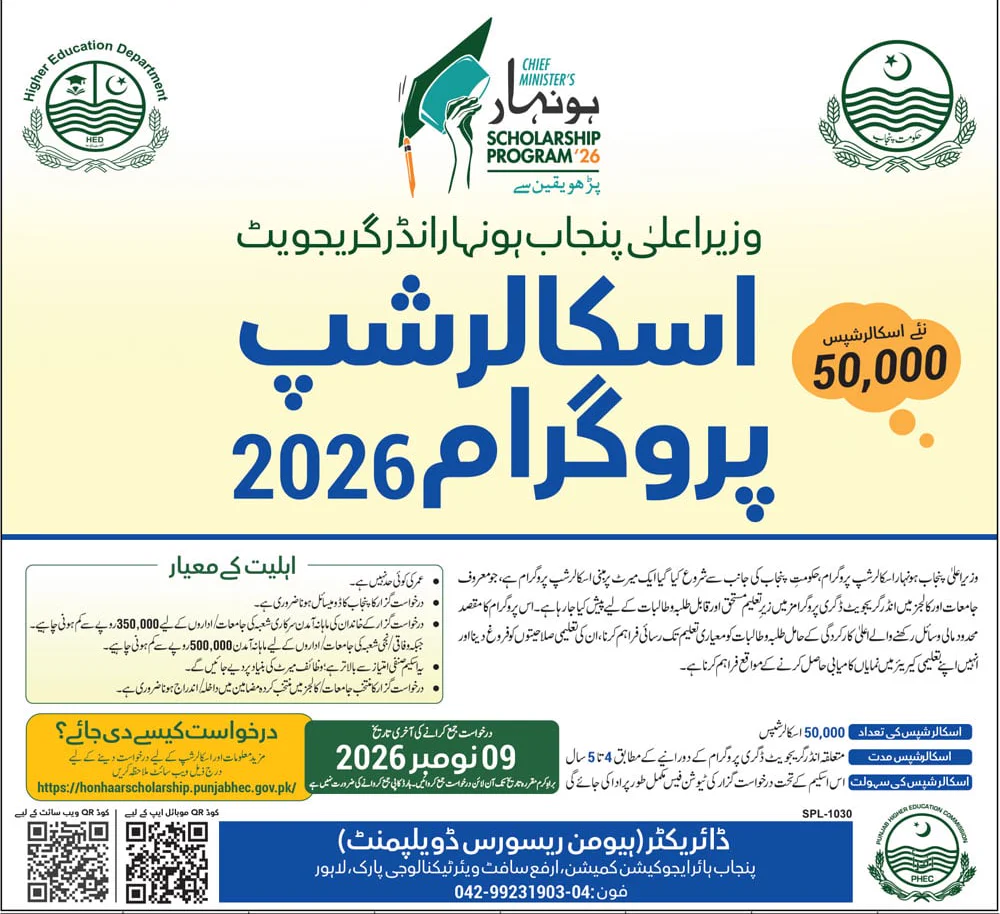
This is the Honhaar Scholarship 2026 how to apply guide for the new phase announced in Jang on 25 October 2026. We read the ad, then checked every claim on the official portal, its FAQ page, its “How to Apply” PDF, the affidavit template and the Google Play listing. Where something is not published, we say so. Our earlier article covers the BS 1st-semester rules and the video guide: CM Punjab Honhaar Scholarship 2026 for BS 1st Semester. This page is the complete walkthrough: what is new, every document, every form field, and the days left.
⏳ Deadline countdown: 15 days left (25 October → 9 November 2026). Do not wait for the last week: the e-stamp affidavit, your domicile and your photo take time, and the portal can be slow near a deadline.
👉 Also Read: CM Punjab Honhaar Scholarship 2026 for BS 1st Semester – Eligibility, Affidavit & Apply Online
In this guide
- Scholarship at a glance
- What is new in this phase
- Ad vs official portal: what we verified
- Eligibility: who can apply
- Minimum marks and merit formula
- Universities, colleges and disciplines
- Documents checklist
- Income affidavit on e-stamp paper
- How to apply: step by step with screenshots
- Plan your 15 days
- After you submit
- Keeping the scholarship
- Mistakes to avoid
- Karna / Nahi karna
- Help desk and contacts
- Honest gaps
- FAQs
Honhaar Scholarship 2026 (Phase IV): Details at a Glance
| Item | Detail |
| Programme | Chief Minister’s Punjab Honhaar Undergraduate Scholarship Program 2026 (“Phase IV” on the portal) |
| Run by | Higher Education Department, Government of the Punjab, through the Punjab Higher Education Commission (PHEC) |
| New scholarships (ad) | 50,000 |
| Who | Merit-based; deserving and talented students in undergraduate degree programmes at selected universities and colleges |
| Benefit | Tuition fee paid under the scheme (ad: “tuition fee paid in full”). The portal’s FAQ says it covers tuition fee only, not hostel, transport or books |
| Duration (ad) | 4 to 5 years, according to the degree programme |
| Last date | 9 November 2026 (ad and portal FAQ) |
| How to apply | Online only: honhaarscholarship.punjabhec.gov.pk (the website QR code in the ad opens it) |
| Application fee | None (portal FAQ). No hard copy needed |
| Ad no. | SPL-1030 |
| Contact (ad) | Director (Human Resource Development), Punjab Higher Education Commission, Arfa Software Technology Park, Lahore. Phone 042-99231903-04 |
| Disciplines | 70 selected disciplines (portal home page) |
What Is New in This Phase
- Two categories: (1) 1st semester / 1st year students, Fall 2026, and (2) 2nd semester / year onward students already studying. Our older article covered mainly category 1.
- A published deadline: 9 November 2026. When we wrote the earlier guide on 16 October the portal had no last date.
- 50,000 new scholarships announced in the Jang ad.
- Partner federal and private universities are open to 1st-year (Fall 2026) applicants only. Students in the 2nd semester or later must be in public-sector universities, public medical/dental colleges or HED colleges.
- A mobile app is advertised by a QR code in the ad (see below).
Ad vs Official Portal: What We Verified (25 October 2026)
| The ad says | Official portal / FAQ says | Result |
| No age limit | No age limit; all genders (home page and FAQ 8) | ✅ Same |
| Punjab domicile needed | Domicile of any district of Punjab (FAQ 9) | ✅ Same |
| Family income under Rs 350,000 (public sector) / Rs 500,000 (federal and private) | Same limits; affidavit on e-stamp (home page, FAQ 23–25) | ✅ Same |
| Awarded on merit | Purely merit based; Matric 30% + Intermediate 70% for 1st semester (home page) | ✅ Same |
| Must be admitted/enrolled in the selected university/college | Enrolled in a selected discipline at a selected institution (home page) | ✅ Same |
| Last date 09 November 2026 | “The last date for submission of online applications is November 09, 2026” (FAQ 2) | ✅ Same |
| Tuition fee paid in full | Covers the prescribed tuition fee only (FAQ 28) | ✅ Same – read it as “tuition fee”, not every expense |
| 4 to 5 years | Matches the PHEC Terms & Conditions PDF (“04/05 years”) | ✅ Same |
| Website + app QR codes | The website QR leads to the portal. The app QR opens a short-link page that points to the Google Play app “Honhaar Scholarships” by Punjab Higher Education Commission. The portal itself shows no app link | ✅ Found, see below |
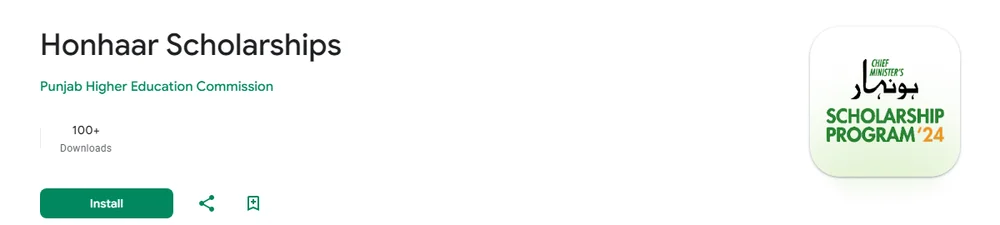
About the app: we decoded the QR code printed in the ad and read the page it opens. We have not installed or tested the app. If you use it, install only the listing published by Punjab Higher Education Commission and never from an APK sent on WhatsApp. The website is the route every official PDF explains, so the screenshots below use the website.
👉 Also Read: Scholarships in Pakistan 2026 – Complete List
Honhaar Scholarship 2026 Eligibility: Who Can Apply
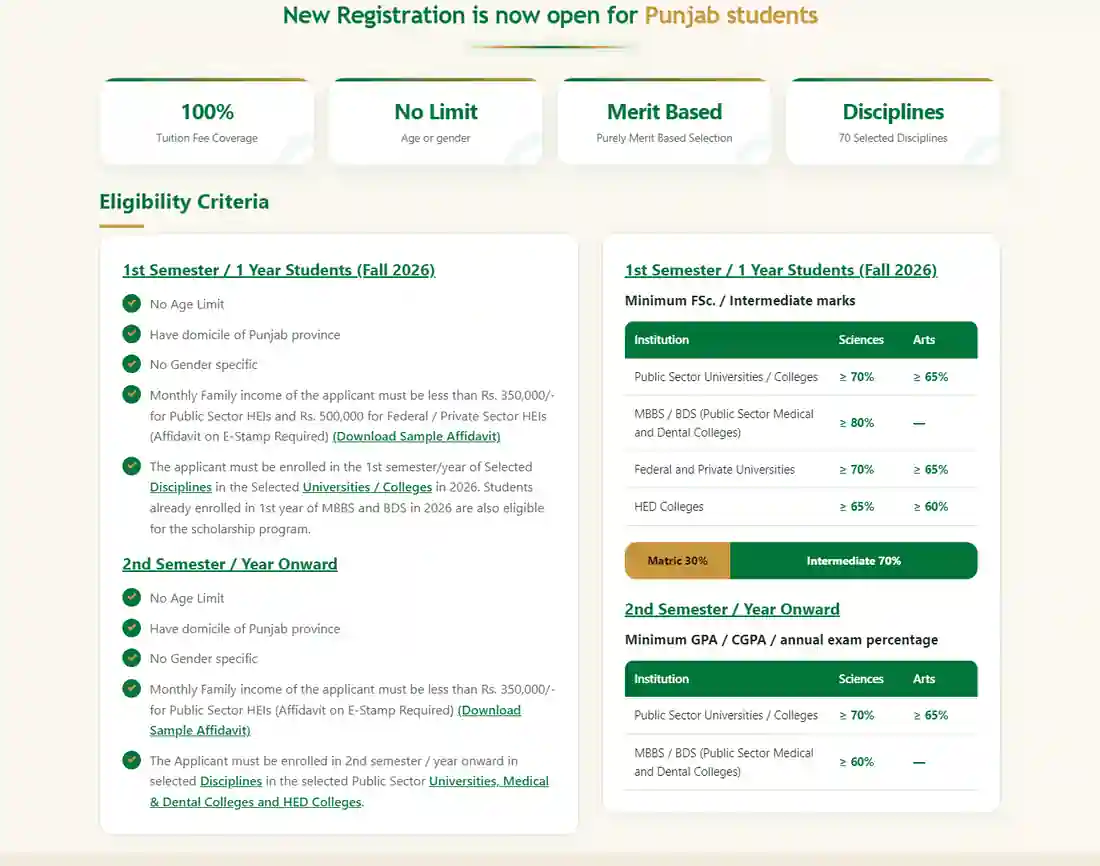
| Rule | 1st semester / 1st year (Fall 2026) | 2nd semester / year onward |
| Age / gender | No age limit; no gender restriction | Same |
| Domicile | Punjab (any district) | Punjab (any district) |
| Family income per month | Under Rs 350,000 (public-sector HEIs) or Rs 500,000 (federal/private HEIs) | Under Rs 350,000 (public-sector HEIs) |
| Where you must study | Selected disciplines at selected public universities, public medical/dental colleges, HED colleges, and partner federal/private universities in 2026. First-year MBBS/BDS students of 2026 are also eligible | Selected disciplines at eligible public-sector universities, public medical/dental colleges and HED colleges (not federal/private) |
| Proof of income | Affidavit on e-stamp paper | Affidavit on e-stamp paper |
Not eligible (official FAQ): students of private or affiliated colleges; anyone who already gets a fee waiver or financial help from another government agency, department, institute, university or college (you must disclose existing help honestly); and students whose discipline or institution is not on the portal’s lists. Meeting the minimum rules does not guarantee a scholarship.
Minimum Marks and the Merit Formula
| Institution | 1st semester: minimum FSc/Intermediate (Sciences / Arts) | 2nd semester onward: minimum GPA/CGPA or annual % |
| Public-sector universities / colleges | ≥ 70% / ≥ 65% | ≥ 70% / ≥ 65% |
| MBBS / BDS (public medical and dental colleges) | ≥ 80% (sciences) | ≥ 60% (annual exam) |
| Federal and private universities | ≥ 70% / ≥ 65% | Not eligible in this category |
| HED colleges | ≥ 65% / ≥ 60% | ≥ 70% / ≥ 65% (FAQ 5; the home-page table does not print this row) |
Merit for 1st-semester applicants: Matric 30% + Intermediate 70% (home page). The portal does not publish a merit-list date or a cut-off. For 2nd-semester applicants the portal does not print a merit formula, so we do not guess one.
Universities, Colleges and Disciplines Covered
The portal’s Institutes page has three tabs. On 25 October 2026 we counted about 91 university entries, about 370 HED colleges and 16 medical and dental colleges (list items on the page). The Discipline page lists the 70 selected disciplines, for example AI/Computer Science, Cyber Security, Data Science, Engineering, MBBS, BDS, Law, Pharmacy, Nursing, Business Administration, Education, Agriculture, Mass Communication, Urdu, English and many more. Always check your own university and your own degree title: if they are not listed, you cannot apply.
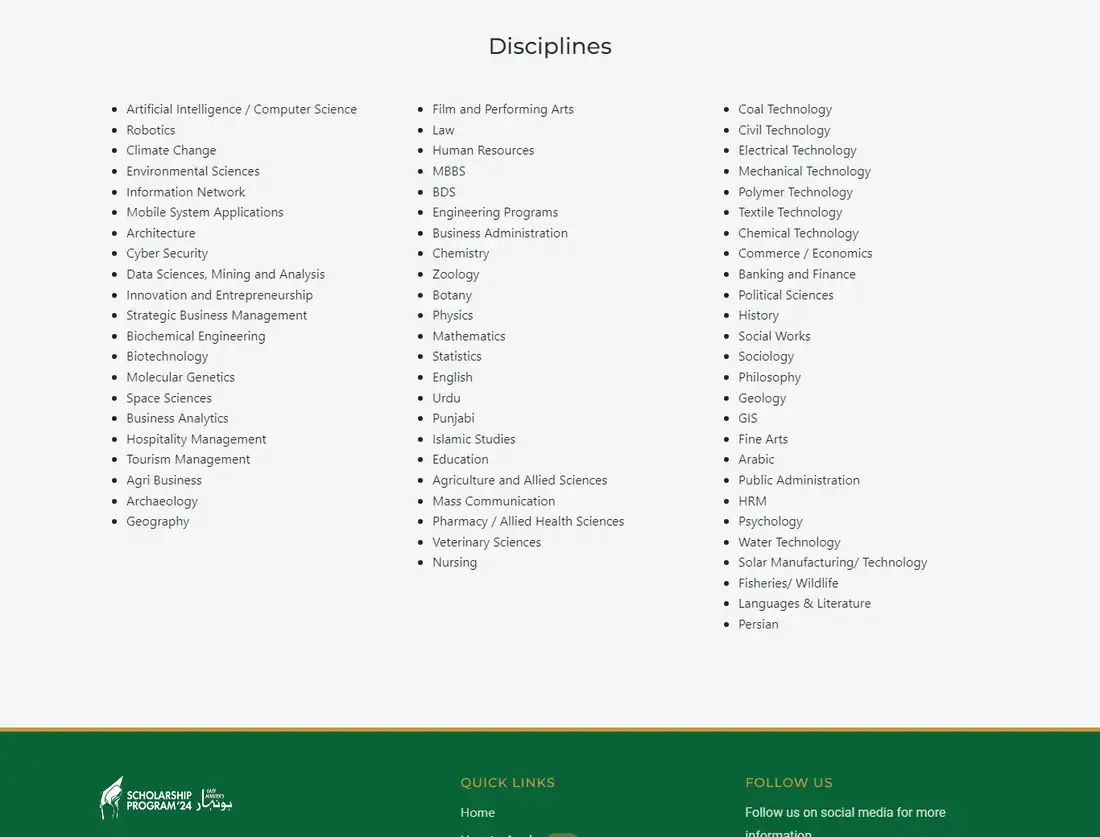
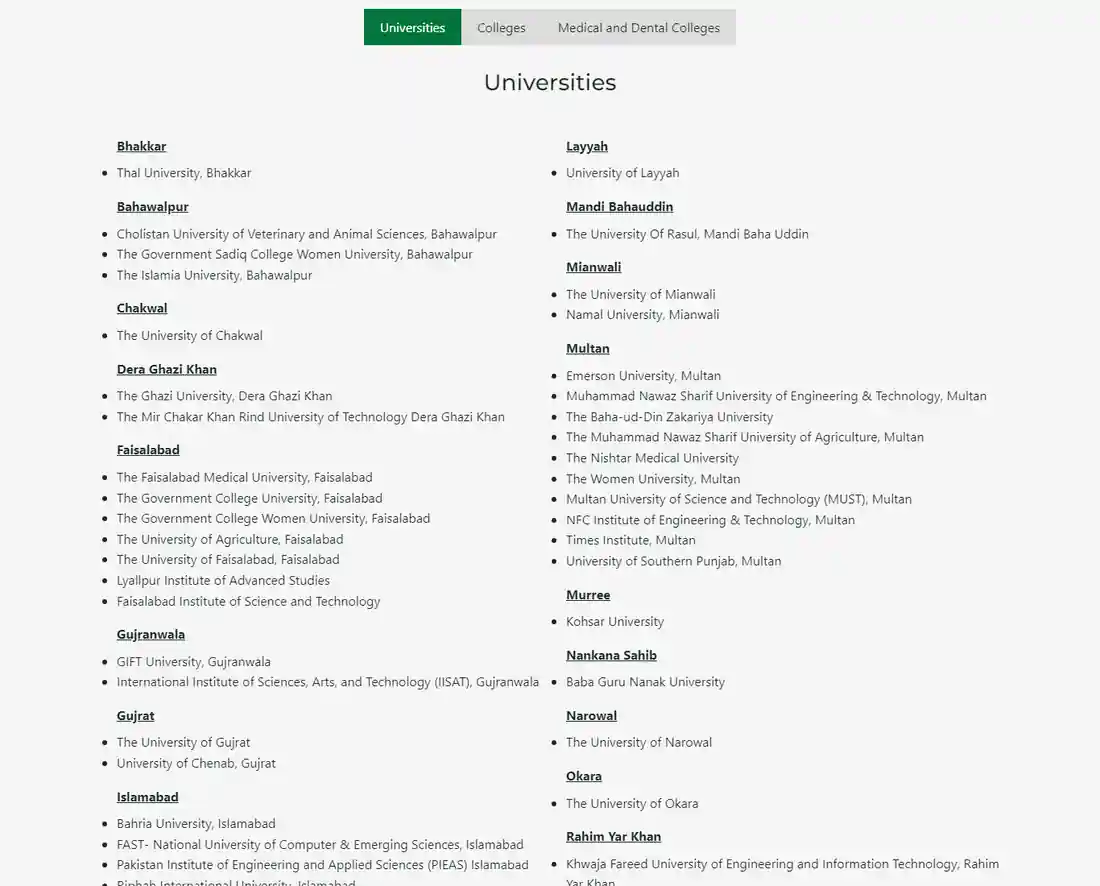
- If your programme is missing from the portal’s drop-down, the FAQ tells you to ask your institution’s focal person.
- Private universities appear on the list only as partners for 1st-year (Fall 2026) students.
Documents Checklist for Honhaar Scholarship 2026
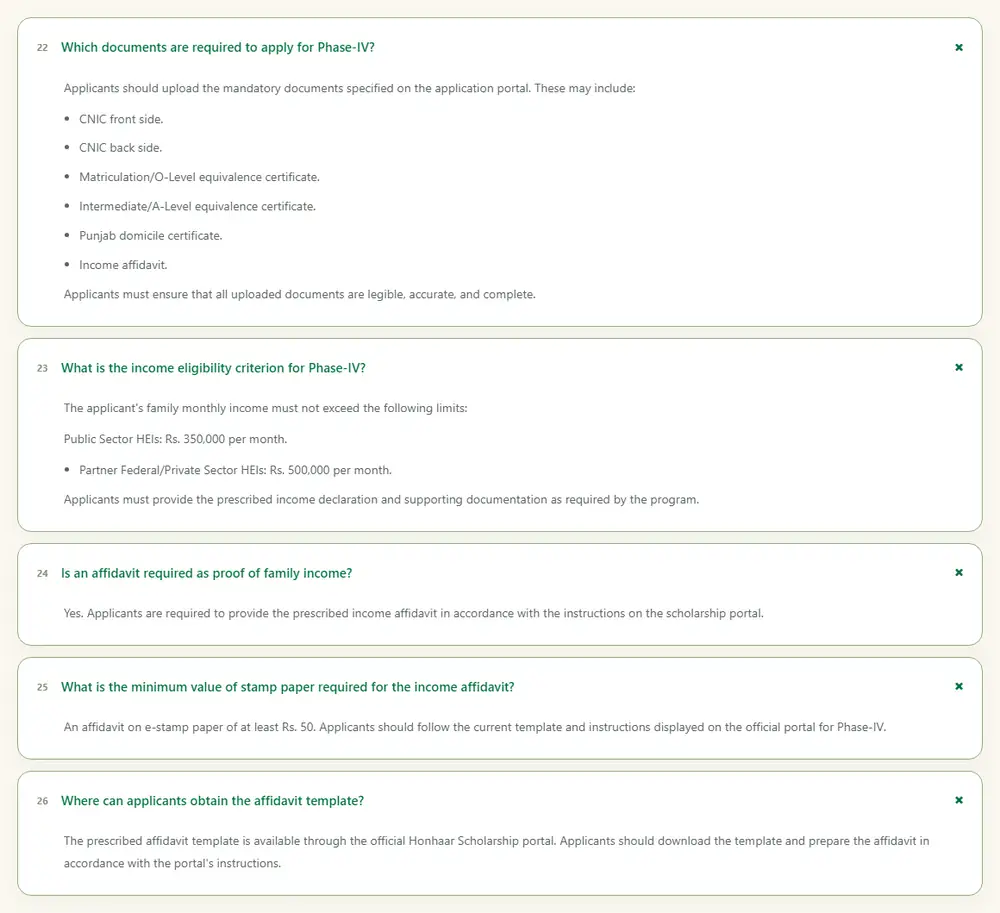
| # | Document | Notes |
| 1 | CNIC front | Your own CNIC. B-form if you do not have a CNIC: the portal asks for your own valid CNIC, and the guide warns that using someone else’s CNIC leads to disqualification |
| 2 | CNIC back | Clear and readable |
| 3 | Matric / O-Level equivalence certificate | Matric result card or certificate |
| 4 | Intermediate / A-Level equivalence certificate | FSc/ICS/FA result card or certificate |
| 5 | Punjab domicile certificate | The FAQ says to provide the domicile certificate (or the domicile application slip) as the portal requires |
| 6 | Income affidavit | On e-stamp paper, from the portal’s template. See the next section |
| 7 | Recent photograph | Uploaded in the Personal Detail tab. The official guide says maximum 200 KB, clear face visible |
File rules: the official How to Apply guide says documents must be JPG/PNG, each under 200 KB, and the FAQ says every upload must be legible, accurate and complete. That guide is the 2025 edition, so read the limit printed on the live Documents tab before you scan. Use our free Image Resizer to bring files under 200 KB.
What is not on the official list: the portal FAQ does not name an admission letter, fee voucher or parent CNIC as mandatory uploads. Some other websites list them. Keep your admission proof and fee voucher ready anyway, because your institution’s focal person verifies applications, but follow what the portal asks.
More free help from Educativz: Image Resizer · Background Remover (passport photos) · CV Builder · AI Quiz & MCQs · Government Jobs
Income Affidavit on E-Stamp Paper: Step by Step
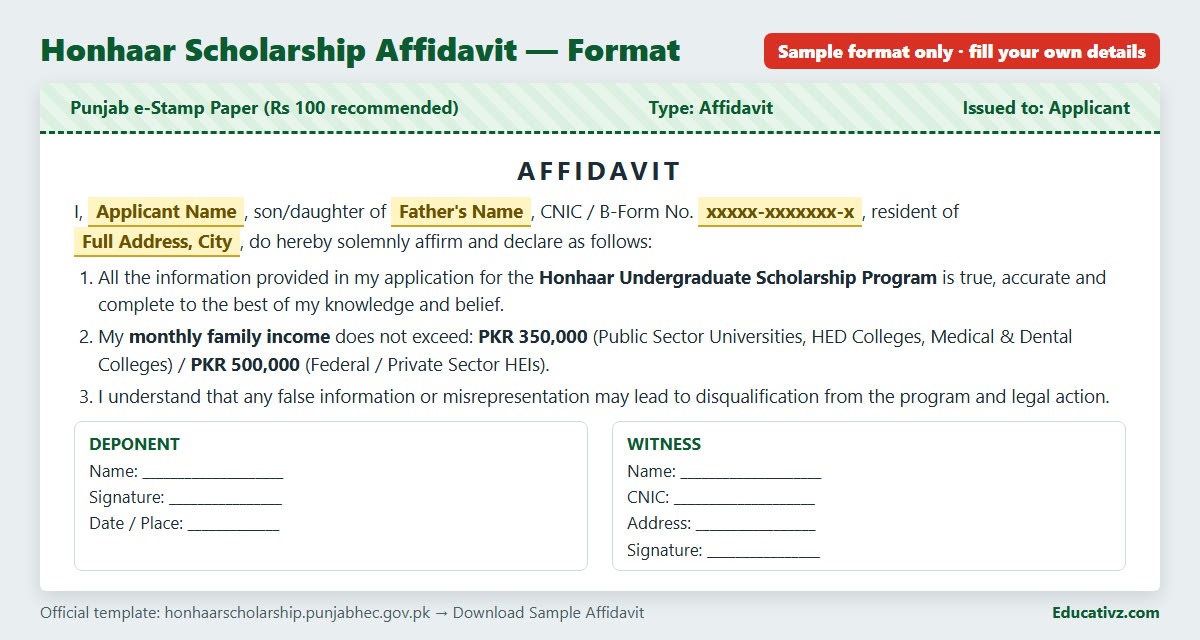
The affidavit proves that your monthly family income is within the limit. The official template (a Word file you download from the portal’s Eligibility tab or home page) is short. We read it on 25 October 2026. It contains:
- Your name, CNIC, father’s name and address.
- A declaration that all information in your application is true, accurate and complete.
- A declaration that family monthly income does not exceed Rs 350,000 (public-sector universities, HED colleges, medical and dental colleges) or Rs 500,000 (federal/private universities).
- A warning that false information can mean disqualification and legal action.
- Signature of the deponent, plus a witness: name, address, CNIC number and signature, with date and place.
Income must be true. The affidavit says false information can lead to disqualification and legal action, and the scholarship rules allow cancellation. If your family income is above the limit, do not apply.
How to Apply for Honhaar Scholarship 2026 Online: Step by Step With Screenshots
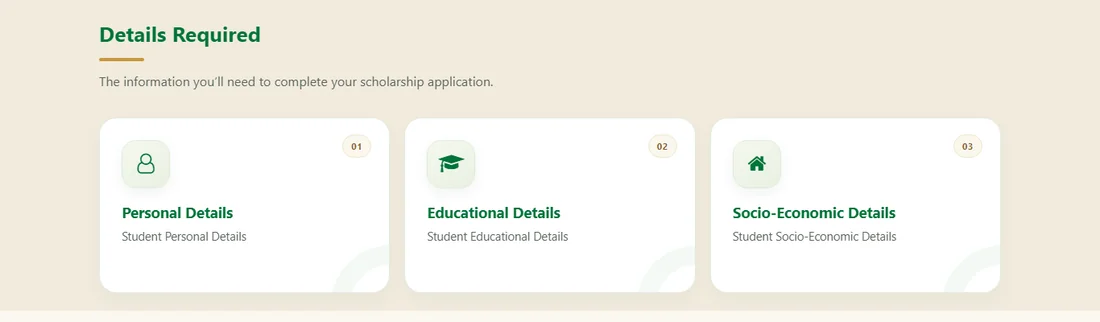
How to read the screenshots: screenshots labelled “REAL (live page)” are our own captures of the public portal pages on 25 October 2026. We did not create an account, log in, type anything or submit anything. Screenshots labelled “OFFICIAL GUIDE” come from the portal’s own How to Apply PDF (2025 edition, sample data, names hidden). The 2026 portal has a newer look and may add fields (for example for 2nd-semester results), so always follow what is on your screen.
Step 1: Prepare before you open the portal
- Check that your university and discipline are on the lists above.
- Keep ready: CNIC, Matric and Intermediate result cards, domicile, e-stamp affidavit, photo, and your university registration or roll number and admission date.
- Have a working email and mobile number: updates come by email.
Step 2: Open the official portal
Type honhaarscholarship.punjabhec.gov.pk yourself, or scan the website QR code in the ad. On the home page press Login (top right) or Apply Now. The page says “New Registration is now open for Punjab students”. The menu also has Home, Discipline, Institutes, FAQs, Help Desk and How to Apply (a video).
Step 3: Register (first time only)
On the login page press Register. The registration form on the live portal has these fields:
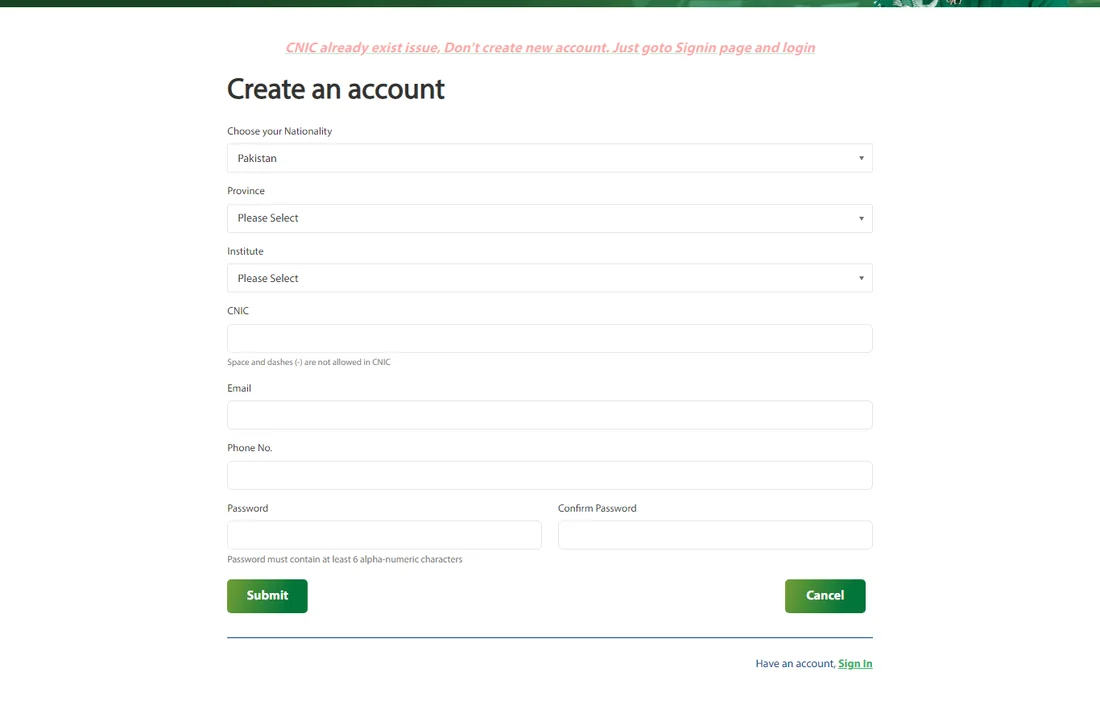
| Field | What to enter |
| Choose your Nationality | Pakistan (pre-selected) |
| Province | Punjab (the list shows Azad Jammu & Kashmir and Punjab) |
| Institute | Your institution type: University, College or Medical College |
| CNIC | 13 digits without spaces or dashes. It must be your own CNIC |
| An email you check daily (the confirmation email goes here) | |
| Phone No. | Your own mobile number |
| Password / Confirm Password | The form says at least 6 alpha-numeric characters. Choose a strong one and write it down |
| Submit / Cancel | Press Submit to create the account |
“CNIC already exist” message? The page itself says: do not create a new account, go to the Sign-in page and log in. If you forgot the password, use Forgot Password? on the login page.
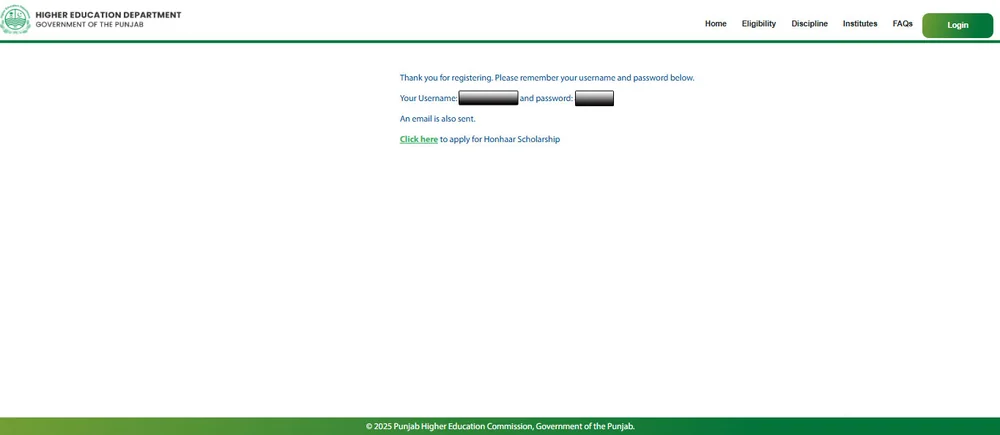
Step 4: Save your username and password
After Submit the official guide says a confirmation message appears with your username and password, and an email is also sent. Save both. Then log in with them.
Step 5: Log in
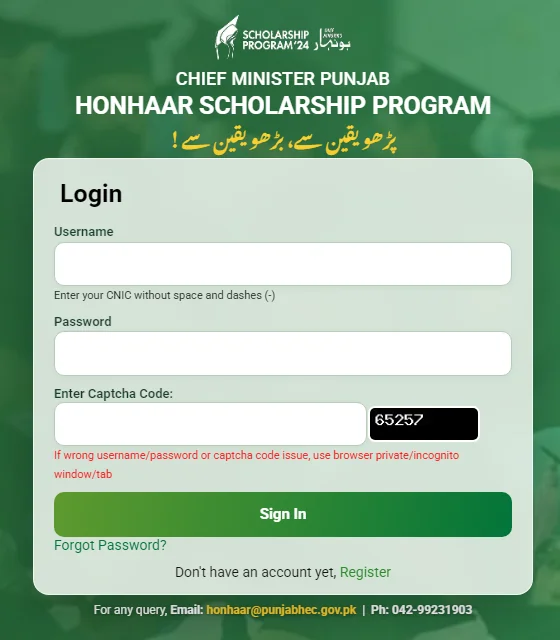
| Field | What to enter |
| Username | Your CNIC without spaces and dashes |
| Password | The password you set |
| Enter Captcha Code | Type the characters shown in the dark box (it changes every time) |
| Sign In | Press to enter the Student Portal |
The portal’s own note says: if you get a wrong username/password or captcha problem, use a browser private/incognito window.
Step 6: Eligibility tab and the sample affidavit
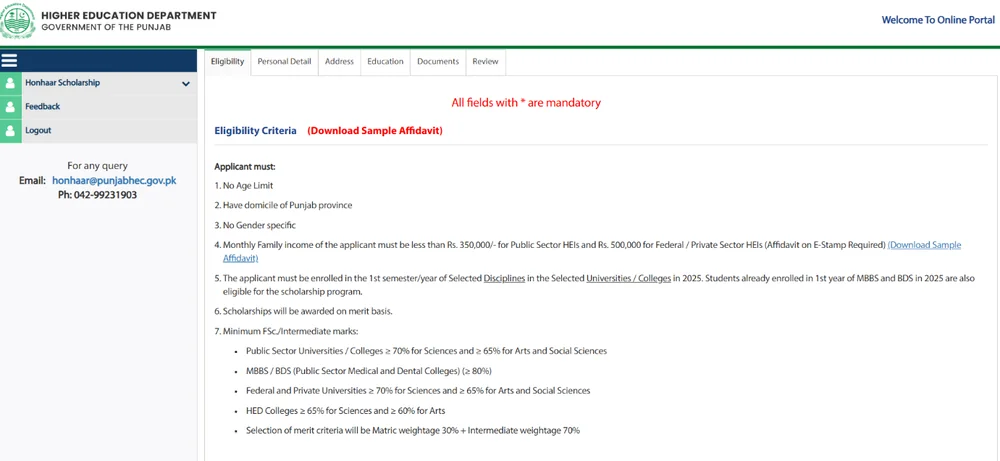
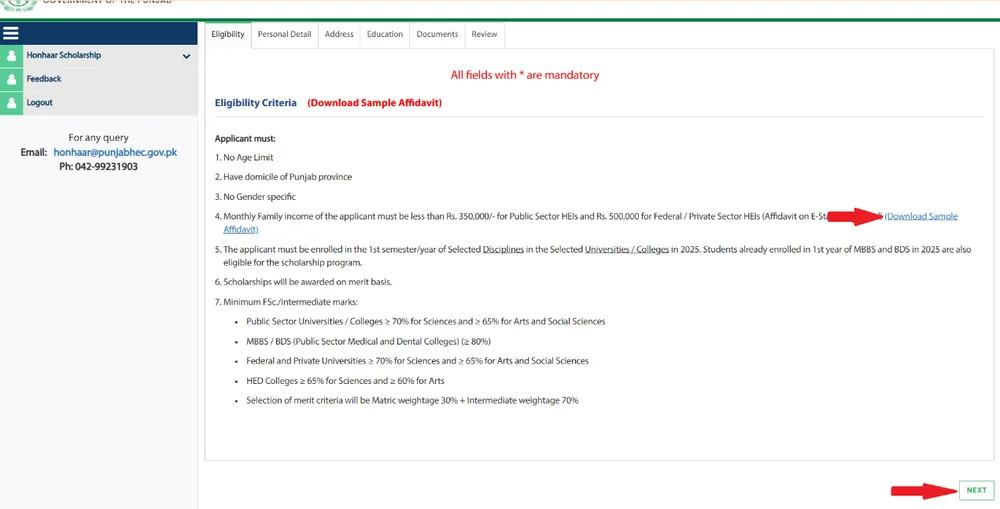
After login the Student Portal opens with tabs: Eligibility → Personal Detail → Address → Education → Documents → Review. The first tab repeats the eligibility rules. Press Download Sample Affidavit (if you have not prepared it yet), then press NEXT at the bottom right. Fields marked with * are mandatory.
Step 7: Personal Detail tab
Fill every starred field correctly. Dates are chosen from the calendar, not typed. The official guide’s form has these fields, from top to bottom:
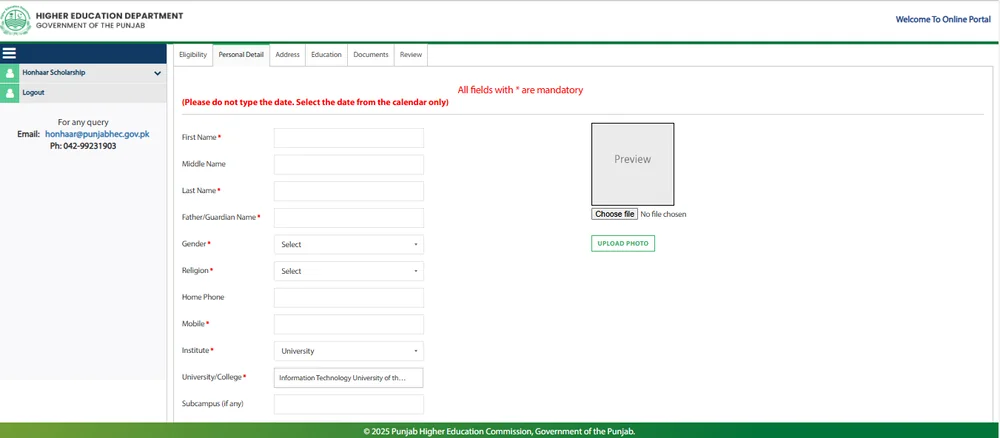
| Field | What to enter / tip |
| First / Middle / Last Name | As on your CNIC and result card |
| Father/Guardian Name | As on your CNIC |
| Gender, Religion | Choose from the drop-down |
| Home Phone, Mobile | Mobile is mandatory |
| Institute | University / College / Medical College |
| University/College, Subcampus (if any) | Select your institution from the list; choose a subcampus only if you study at one |
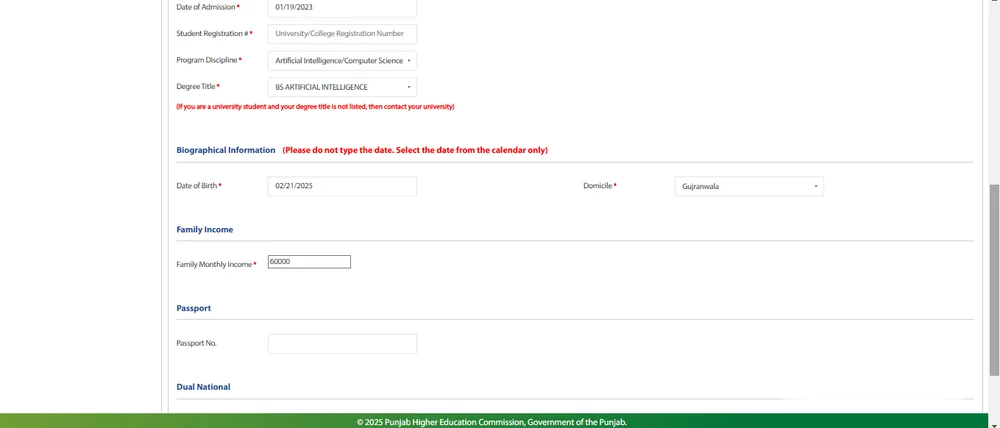
| Date of Admission | Pick from the calendar |
| Student Registration Number | Your university registration number (the FAQ allows a roll number if you have no registration number, and says to ask your focal person if the portal rejects it) |
| Program Discipline, Degree Title | Select from the drop-down. If your degree title is not listed, contact your university (the form says so in red) |
| Date of Birth | Pick from the calendar |
| Domicile | Your Punjab district |
| Family Monthly Income | Your true monthly family income in rupees, within the limit and the same as your affidavit |
| Passport No., Dual National (if any) | Only if applicable |
| Photograph (Choose file → Upload Photo) | Recent photo, maximum 200 KB, clear face |
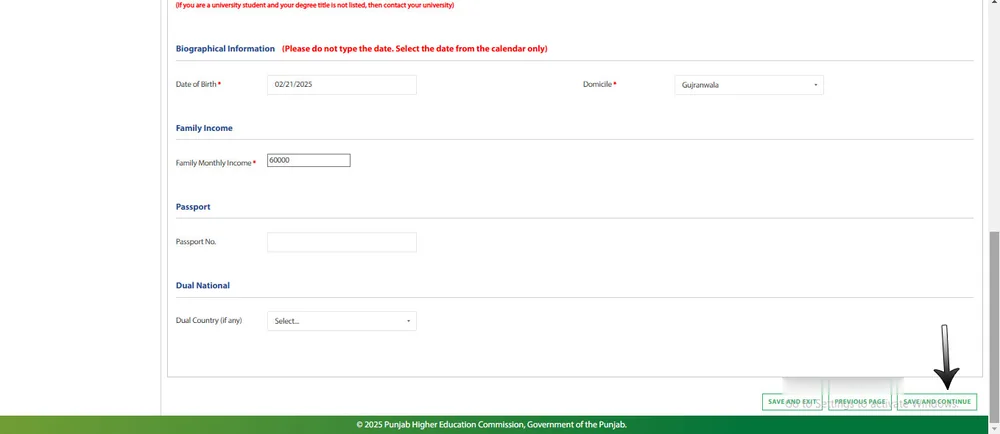
At the bottom of each tab you have three buttons: SAVE AND EXIT, PREVIOUS PAGE and SAVE AND CONTINUE. Press Save and Continue to save and move on. Use Save and Exit if you need to stop and finish later.
Step 8: Address tab
| Field | What to enter |
| Mailing address: Country, Province/Region, District, City | Where you receive mail (for example Pakistan → Punjab → your district and city) |
| Mailing / Postal Address | House, street, area |
| Permanent address checkbox | Tick “check if permanent address is same as mailing address” if it is the same; otherwise fill the permanent address fields |
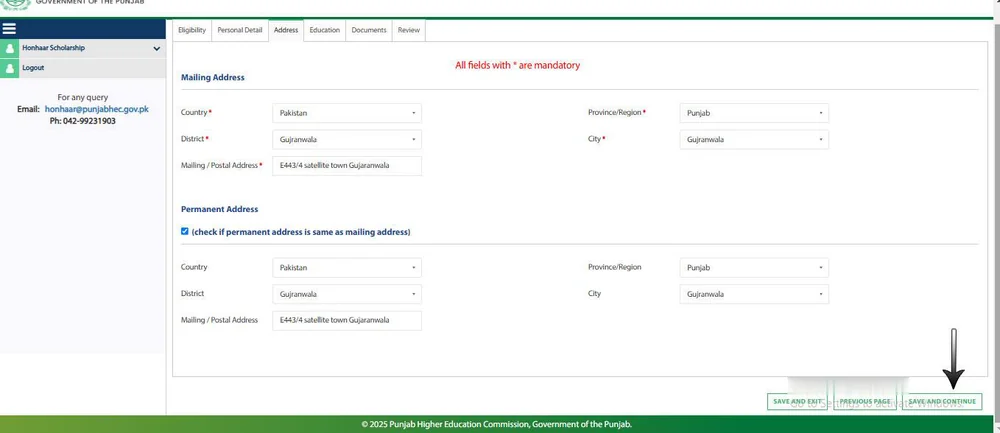
Step 9: Education tab
Enter your results exactly as printed on the result cards. There are two blocks:
| Block | Fields |
| Secondary School Certificate / Matriculation / O-level / Diploma | Program Title (Matric), Institute Name (your board), Discipline (Science/Arts etc.), Obtained Marks, Total Marks |
| Higher Secondary Certificate / Intermediate / A-level | Program Title (Intermediate), Institute Name (board), Discipline, Obtained Marks, Total Marks |
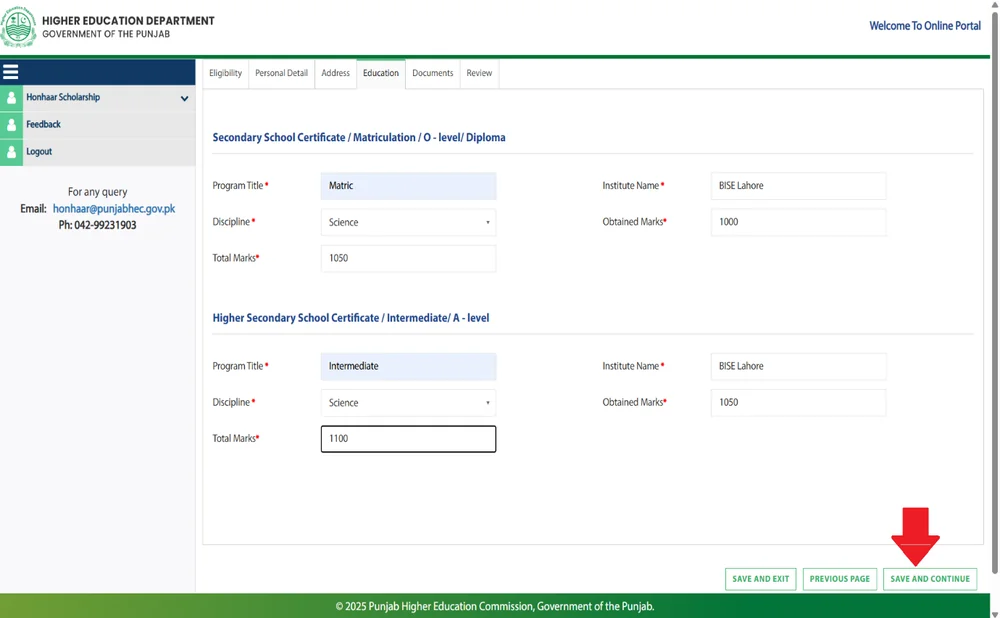
If your latest result has not been announced, the FAQ says to enter the available information accurately, follow the portal’s instructions and ask your institution’s focal person before submitting.
Step 10: Documents tab
Upload six files, each with its own Choose file button and a green “Click to upload …” button: CNIC front, CNIC back, Matric/O-Level certificate, Intermediate/A-Level certificate, Domicile certificate, Affidavit. After each upload the page shows “Image uploaded successfully”. Then press Save and Continue.
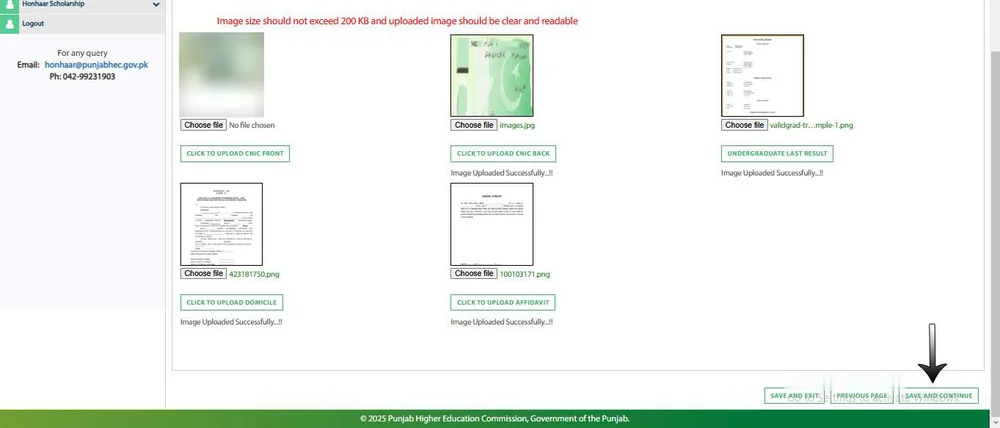
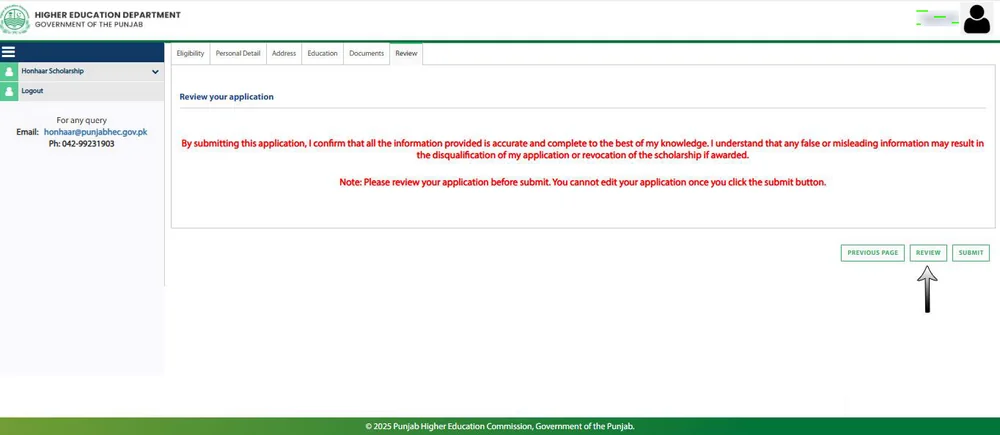
Step 11: Review tab
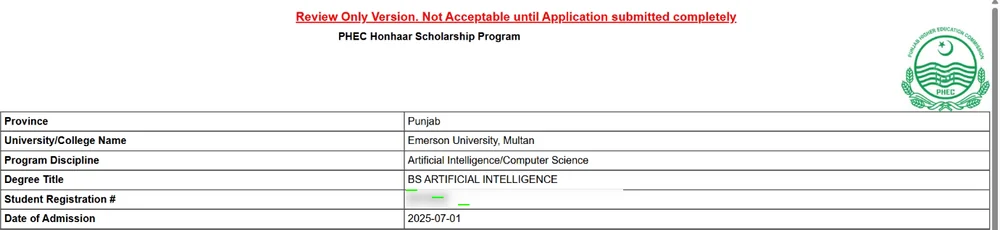
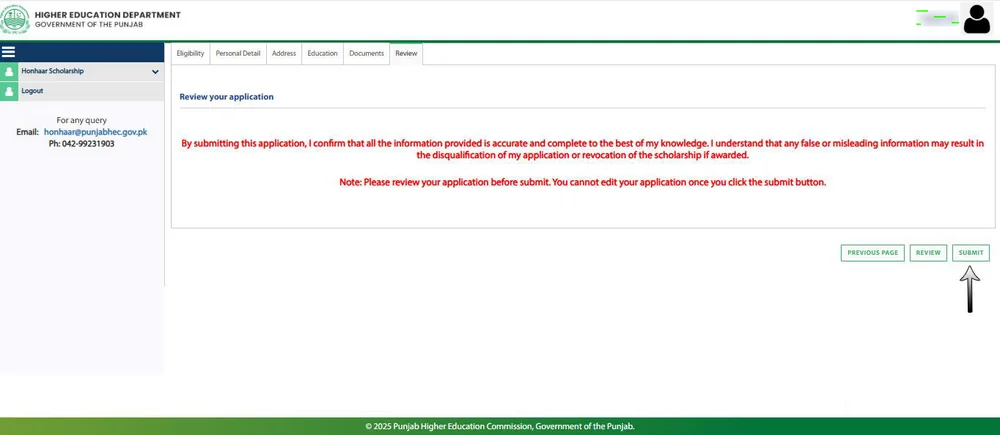
The Review tab shows: “By submitting this application, I confirm that all the information provided is accurate and complete… false or misleading information may result in the disqualification of my application or revocation of the scholarship.” It also warns: you cannot edit your application once you click Submit. Press Review to open the review-only version of your form and check every line against your documents. Go back with Previous Page to fix any mistake.
Step 12: Submit (the most important step)
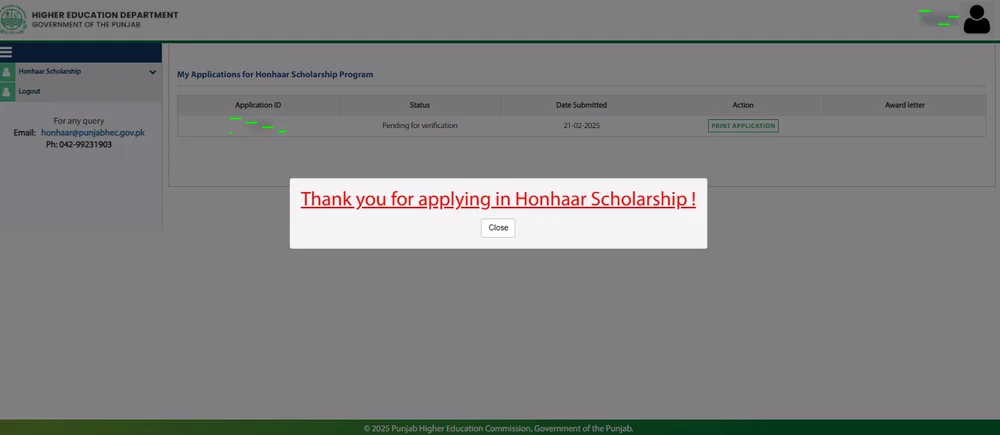
Press SUBMIT. The portal shows “Thank you for applying in Honhaar Scholarship!”. The guide stresses that submission is mandatory: a saved but unsubmitted form is not an application.
Step 13: After submitting
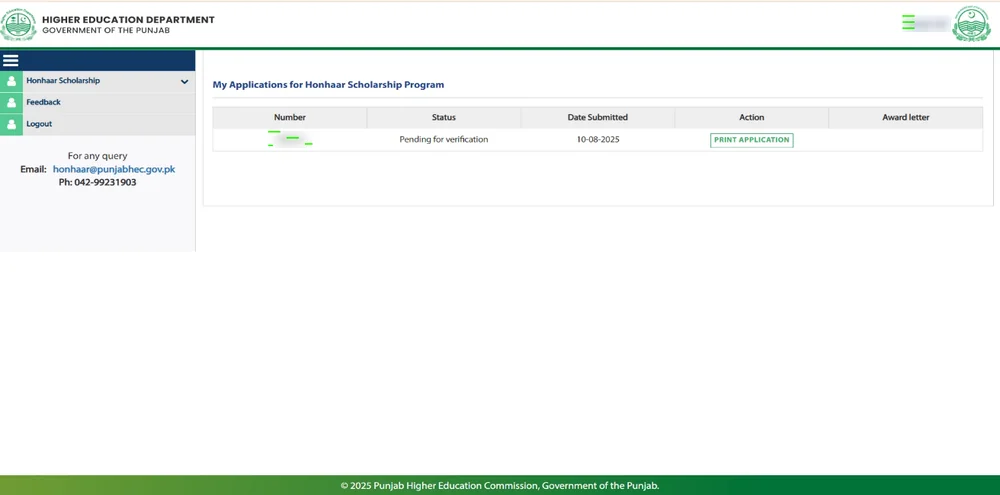
An application ID is generated automatically and your status appears under “My Applications” (in the sample: “Pending for verification”). You can Print Application and save a copy. Screenshot or print it.
Prefer a video? Our Urdu video guide to the Honhaar form is here: youtu.be/LfSwx7iVTZA. The portal’s own “How to Apply” video is on its menu; the official PDF is How to Apply.pdf.
A Simple Plan for the 15 Days Left
This is our suggestion, not an official schedule:
| When | What to do |
| 25–27 October | Check your university and discipline on the lists. Collect result cards, CNIC and domicile |
| 28–30 October | Prepare and sign the e-stamp affidavit; scan everything under 200 KB |
| 31 Oct – 2 November | Register, log in and fill all tabs. Save and Continue each time |
| 3–5 November | Review twice, then Submit. Print the application |
| 6–8 November | Spare days for portal problems and focal-person corrections |
| 9 November 2026 | Official last date. Do not plan to submit on this day |
After You Submit: Verification, Corrections and Results
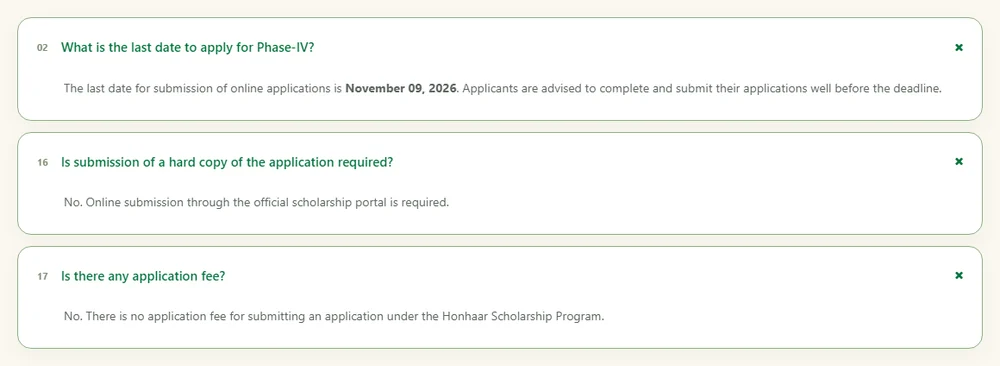
- Verification: your institution’s focal person checks your application. If something is wrong, the FAQ says to contact the focal person; where a correction chance is given you must fix and resubmit in time or the application can be treated as ineligible.
- Updates: by the email you gave (check spam/junk too), on the portal, or through your institution.
- Selection: merit based, after verification and subject to the number of scholarships. The portal gives no result date.
- Payment: the tuition fee is paid for you, directly to the institution, not to the student (earlier PHEC terms and our earlier article say so; the 2026 portal does not repeat this in the FAQ).
Keeping the Scholarship: CGPA and Other Rules
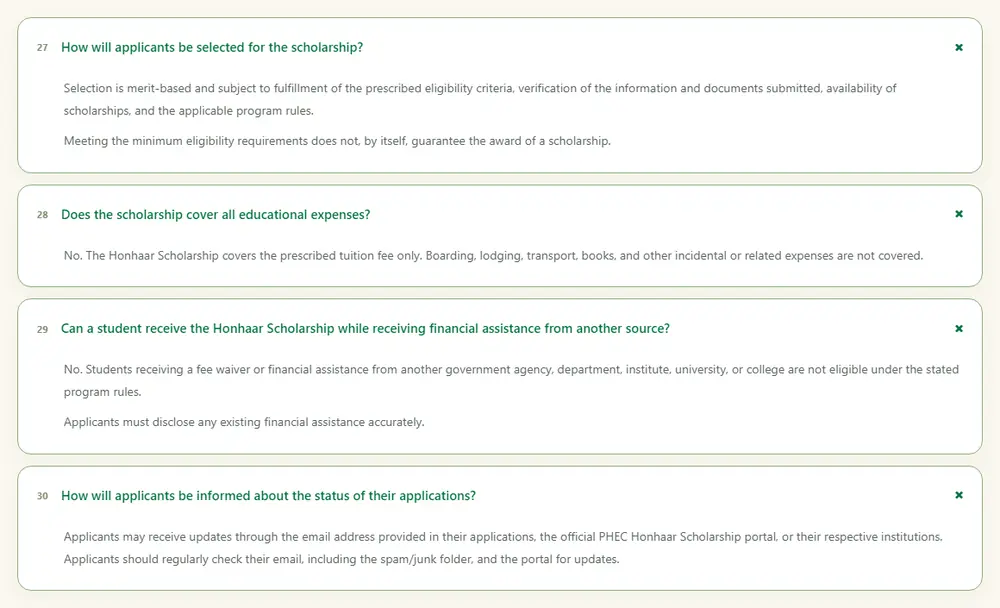
The PHEC SOPs PDF on the portal (which we read on 16 October 2026) sets a minimum 2.70 CGPA to keep the scholarship, and says that at federal/private universities PHEC pays 50% and the university bears the other 50% of the fee. The older January 2025 Terms & Conditions PDF (2.50 GPA per semester, 3.00 CGPA, and “admission charges” covered) is outdated and conflicts with the SOPs. Both files are linked from the portal footer; read the SOPs yourself and ask your university how the 50% share works for you: SOPs PDF · Terms & Conditions PDF.
Other terms in the Terms PDF: you may not change university (that cancels the scholarship); you may change course within the same university only with intimation to PHEC; complete your programme within the academic calendar.
Common Mistakes That Lose Applications
- Saving the form but never pressing Submit.
- Using someone else’s CNIC to register (disqualification).
- Creating a second account when the portal says the CNIC already exists: log in instead.
- Income figure in the form different from the affidavit.
- Blurry, cropped or oversized scans; the affidavit missing the stamp or witness details.
- Picking the wrong degree title or institution type.
- Waiting for the last day.
- Using a fee-waiver or another government scholarship at the same time and not disclosing it.
Karna / Nahi Karna: Do and Don’t
✅ Karna (Do)
- Apply only on honhaarscholarship.punjabhec.gov.pk or the official PHEC app.
- Read the live portal’s eligibility and FAQ on the day you apply.
- Keep your username, password and application ID safe.
- Print or screenshot your submitted application.
- Contact the help desk or your focal person for any problem.
❌ Nahi karna (Don’t)
- Do not pay any agent, “consultant” or WhatsApp number: there is no application fee.
- Do not send hard copies or documents by courier: online submission is required.
- Do not install an app from an APK or a link sent on WhatsApp.
- Do not share your portal password or captcha with anyone.
- Do not apply if your family income is above the limit or you already get a fee waiver elsewhere.
📢 Daily job alerts: WhatsApp Channel | WhatsApp Group. Always verify details on the official website.
Honhaar Help Desk and Contacts
| Channel | Detail (from the official help-desk page and ad) |
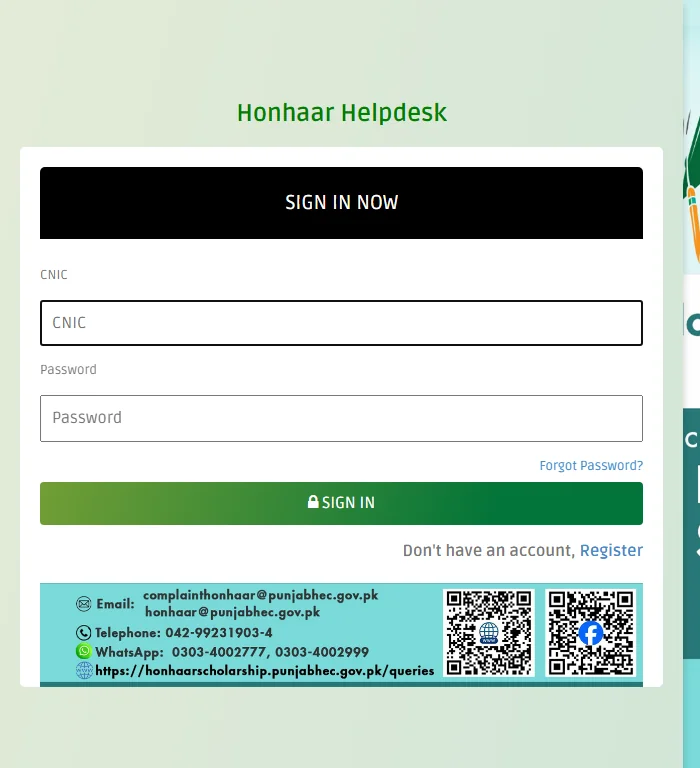
| Help desk | honhaarscholarship.punjabhec.gov.pk/queries (sign in with CNIC) |
| Telephone | 042-99231903-4 (guide: 09:00 AM to 05:00 PM) |
| WhatsApp (as printed on the help-desk page) | 0303-4002777, 0303-4002999 |
| honhaar@punjabhec.gov.pk and complainthonhaar@punjabhec.gov.pk | |
| Address in the ad | Director (Human Resource Development), Punjab Higher Education Commission, Arfa Software Technology Park, Lahore |
Honest Gaps: What Is Not Published
Neither the ad nor the public pages tell us the following. Do not trust anyone who quotes a number:
- How many of the 50,000 scholarships go to each institution, discipline or category.
- The merit list date, the cut-off marks, and the exact date scholarships start.
- The exact fields behind the login for the 2026 phase. We did not log in, so the field-by-field screenshots are from the official 2025 guide; check your live screen.
- The merit formula for 2nd-semester applicants.
- Whether the mobile app mirrors every step of the website (we have not tested it).
- A deadline extension. Earlier phases were extended, but none is announced now. Plan for 9 November.
Honhaar Scholarship 2026 Frequently Asked Questions (FAQs)
What is the last date for Honhaar Scholarship 2026 (October 2026 phase)?
The ad in Jang Lahore (25 October 2026) and the official portal FAQ both say 9 November 2026 for online submission. From 25 October that is 15 days.
How do I apply for the Honhaar Scholarship 2026 online?
Open honhaarscholarship.punjabhec.gov.pk, register with your own CNIC, log in, fill the Personal Detail, Address, Education and Documents tabs, review, and press Submit. Saving alone does not count.
What documents are required for Honhaar Scholarship 2026?
CNIC front and back, Matric/O-Level certificate, Intermediate/A-Level certificate, Punjab domicile certificate and the income affidavit, plus a recent photo. Each file should be legible and under the portal’s size limit (200 KB in the official guide).
What is the income limit for the Honhaar Scholarship?
Family income must be under Rs 350,000 per month for public-sector institutions and under Rs 500,000 per month for partner federal and private universities. You prove it with an affidavit on e-stamp paper.
Is there any fee or agent for Honhaar Scholarship?
No. The portal FAQ says there is no application fee and no hard copy is required. Do not pay anyone.
Can 2nd-year or 3rd-year students apply?
Yes, students in the 2nd semester/year onward can apply if they are in selected disciplines at eligible public-sector universities, public medical/dental colleges or HED colleges and meet the GPA/CGPA minimums (70% sciences, 65% arts; 60% for MBBS/BDS) and the Rs 350,000 income limit.
Can private university students apply for the Honhaar Scholarship 2026?
Yes, but only 1st-semester/1st-year (Fall 2026) students of the partner federal/private universities listed on the portal, with minimum 70% (sciences) or 65% (arts) in Intermediate. Private or affiliated colleges are not eligible.
Does the scholarship cover hostel, books and transport?
No. The official FAQ says it covers the prescribed tuition fee only.
How long does the Honhaar Scholarship last?
The ad says 4 to 5 years, according to your degree programme, subject to the academic performance rules.
Is there an official Honhaar Scholarship app?
The QR code in the ad leads to a Google Play listing named “Honhaar Scholarships” published by Punjab Higher Education Commission (updated 23 October 2026). The website is the route explained in all official guides.
What if the portal rejects my registration number or my degree is not listed?
The FAQ says to use the registration or roll number the portal accepts, and to contact your institution’s focal person if it does not, or if your programme is not in the drop-down.
People Also Search
Honhaar scholarship 2026 apply online Honhaar scholarship last date 9 November 2026 Wazir e Alla Punjab Honhaar scholarship Punjab scholarship 2026 Honhaar scholarship how to apply Honhaar scholarship documents required Honhaar scholarship income affidavit PHEC Honhaar scholarship phase 4 Honhaar scholarship app ہونہار اسکالرشپ پروگرام 2026 وزیراعلیٰ پنجاب ہونہار انڈر گریجویٹ اسکالرشپ ہونہار اسکالرشپ آخری تاریخ
About the Author
Muhammad Imran is the founder of Educativz.com. He provides verified and high-ranking career updates for professionals across Pakistan.